 Helm Sparkle
Documentation / Core concepts
Brand
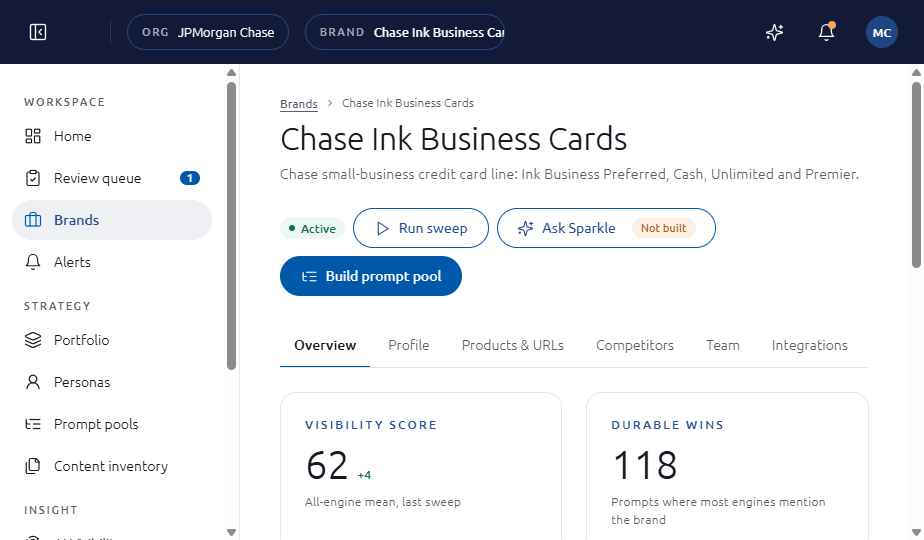
A brand is the unit Sparkle measures. Each brand has its own profile, products, competitors, brand voice, team and engines, and its own prompt pools and sweeps.
How it works
A brand workspace is created with the brand wizard. The wizard starts from the brand's website, from a brief or from an empty form. It needs at least one Brand Manager on the Team and engines step before it can be finished.
What a brand contains
- Profile: name, domain and category.
- Products and URLs, which name what the brand sells and the pages that describe it.
- Competitors and aliases.
- Brand voice, used when drafts are checked against the brand guardrail.
- Team and engines.
Where you see it
Workspace, then Brands. Open a brand to see its tabs.
Set it up
- Sign in as an Org Administrator or Brand Manager, then open Brands.
- Choose New brand and pick a start: prefill from the website, upload a brief or enter details manually.
- Complete Basics, Products and URLs, Competitors, Team and engines, then Review. Assign at least one Brand Manager.
See also
Last updated
Was this page helpful?Contact support