 Helm Sparkle
Documentation / Core concepts
Prompt pool
A prompt pool is the approved set of questions that a sweep asks each engine. Pools move through Draft, In review and Approved.
How it works
An analyst builds the pool from sources, sets its funnel mix and sends it to the Brand Manager. An approved pool runs in the next scheduled sweep.
Parts of a pool
- Sources: Search Console, SEMrush, a YAML file and LLM expansion, each with a weight.
- Funnel mix: Awareness, Research, Consideration and Decision, which always total 100.
- Coverage matrix: shows which personas and intents the pool covers.
- Annotations and reason codes, added by the Brand Manager when a pool is sent back.
Where you see it
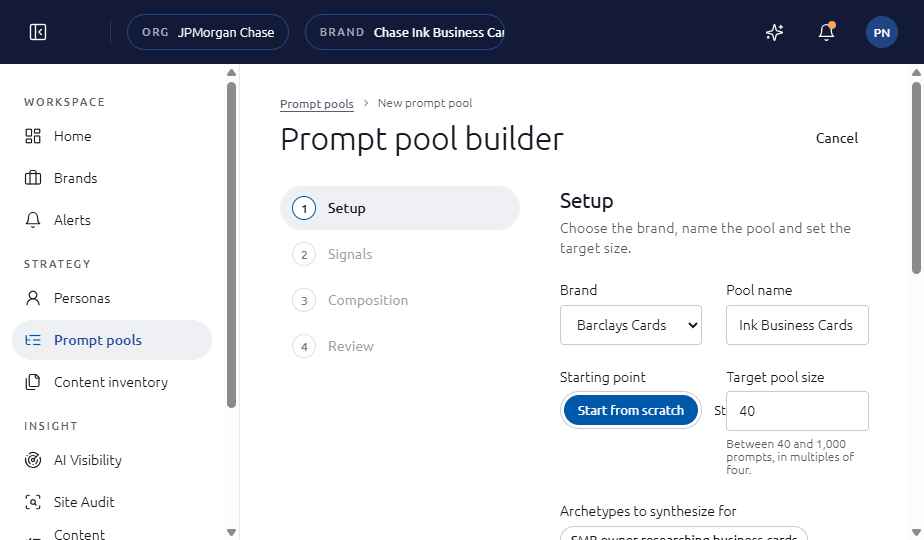
Strategy, then Prompt pools. The builder has four steps: Setup, Signals, Composition and Review.
Set it up
- Open Strategy, then Prompt pools, and choose New prompt pool.
- Setup: choose the brand and the pool size. Signals: connect and weight each source.
- Composition: set the funnel mix so it totals 100, and check the coverage matrix.
- Review and send for approval. The Brand Manager approves the pool for the next sweep.
See also
- Build a prompt pool (guide task)
- Journey step 4: Build a prompt pool
- Journey step 5: Review and approve the pool
Last updated
Was this page helpful?Contact support