 Helm Sparkle
Documentation / Core concepts
Organization
An organization is a customer account in Sparkle. It holds the users, brands, integrations and entitlements for one customer.
How it works
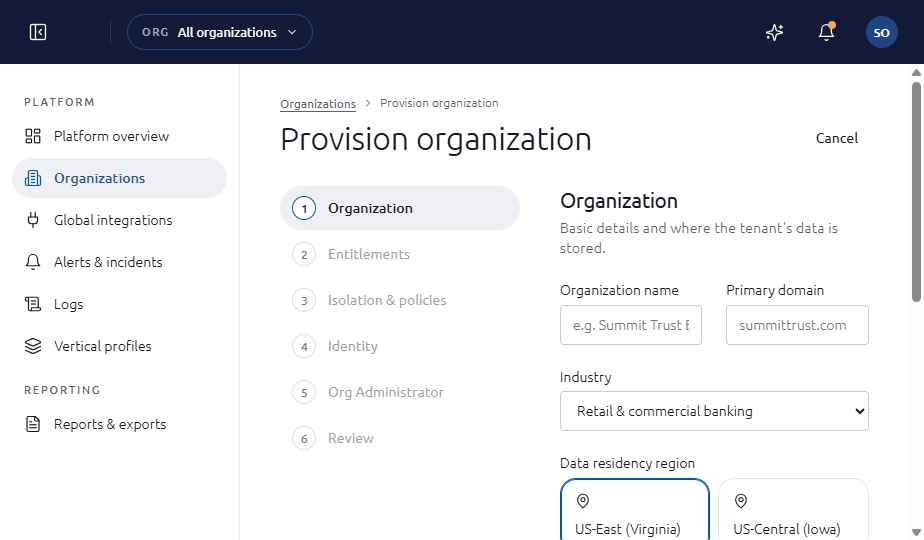
Super Administrators create an organization in the provisioning wizard. The wizard sets the industry, data residency region, seats, the engines the organization may measure, markets and the sign-in method, then names the first Org Administrator.
What an organization contains
- Status, such as Active or Paused, managed from the organization detail page.
- Entitlements: the engines and seats the organization has.
- Isolation and policies, set when the organization is created.
- Users and roles, brands, integrations and reports.
Where you see it
Platform, then Organizations, in the Super Administrator view. The Org overview in the Org Administrator view.
Set it up
- Sign in as a Super Administrator, then open Platform and Organizations.
- Choose New organization and complete the six steps: Organization, Entitlements, Isolation and policies, Identity, Org Administrator and Review.
- Confirm. The Org Administrator receives the first invitation.
See also
Last updated
Was this page helpful?Contact support