 Helm Sparkle
Documentation / Core concepts
Persona
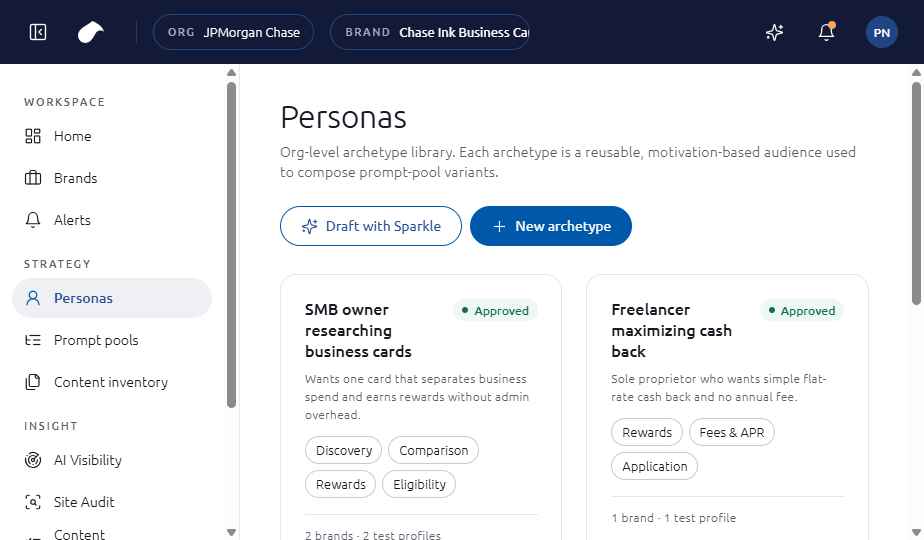
A persona is a customer type whose questions Sparkle measures. Results are reported for each persona.
How it works
A persona describes who is asking. Sparkle uses it to shape the prompts in a pool, and AI Visibility shows how the brand performs for each persona.
Parts of a persona
- Motivation: why this customer is looking.
- Intents: Discovery, Comparison, Rewards, Fees and APR, Eligibility and Application.
- Tone: how the customer talks about the category.
Example
SMB owner researching business cards. Motivation: wants one card that separates business spend and earns rewards without admin overhead.
Where you see it
Strategy, then Personas, and the Personas tab in AI Visibility.
Set it up
- Open Strategy, then Personas, and choose New archetype.
- Enter the name and motivation, then choose the intents and tone.
- Save the persona. It is available to prompt pools and appears in the Personas tab of AI Visibility.
See also
Last updated
Was this page helpful?Contact support